![that destination from [our] conversation](https://blogger.googleusercontent.com/img/b/R29vZ2xl/AVvXsEi5-n4tBCnwKdDjQjLTzOSaJ28jrO-n4Em9oR2kW7-FQL2Bd1jtyW9zQ31gO9AuCnu4h3v5JRq2ka7oEr_GGfKNKnl-ifB0yeE5ize_hPPT3jFK_g59SBQP0Anrexu2K_5jjz0yUKT0JR68/s1600/gwr2.jpg)
Sunday, June 16, 2013


Wednesday, June 12, 2013
Win8 Collection HTML Files
Thursday, May 23, 2013
So small now
Reposted from RasberryPi on blogger over here...
Installing the Raspberry Pi Camera Module - Part 1
Ok, so lets have a look at what you get for your hard earned cash. The ruler is included in the photos to give an idea of scale. The actual camera is tiny and is mounted on a board which is only about 25mm x 25mm:

The camera board comes with a pre-fitted ribbon cable which is about 15 cm long. The following photos show front and back views of the complete assembly as supplied.


Unfortunately the camera module isn't quite "plug and play" and there are a few preparatory tasks to perform before before it can be used with the Raspberry Pi.
First of all you need to download the latest release of the Raspbian "Wheezy" operating system from www.raspberrypi.org and install it on a freshly formatted SD(HC) memory card (4GB or larger). At the time of writing the most recent release is dated 2013-02-09. I've covered in detail how to make a bootable SD(HC) card in a previous post so I won't repeat it here.
The first time you boot from this new SD(HC) card "Raspi-config" will run automatically. Use the "expand_rootfs" option to expand the root partition on the SD(HC) card to use all the available space (how to do this is covered in detail in a previous post).
Now choose the "memory_split" option and press Enter:

This option allows you to specify how much memory to allocate to the graphics processor. Type in "128" and press Enter:
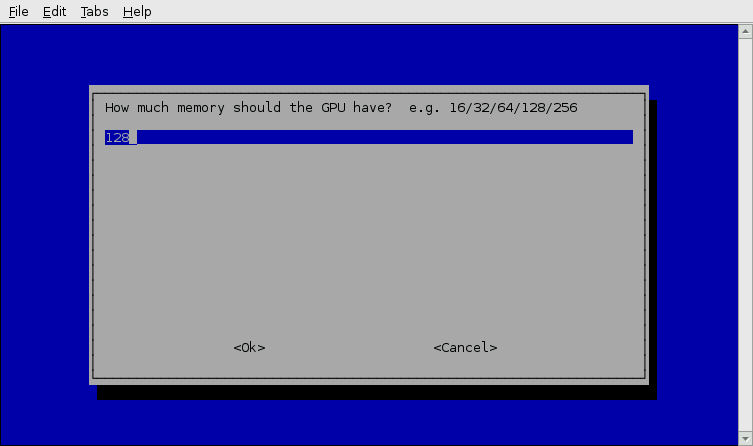
Now select "Finish" and allow your Raspberry Pi to reboot. Then log in and run the "sudo apt-get update" and "sudo apt-get upgrade" commands. Details of how to do this can be found here if you need them.
Let your Raspberry Pi reboot and then run the "Raspi-config" commmand again by typing "sudo raspi-config" at the command line prompt and pressing Enter:
pi@raspberrypi ~ $ sudo raspi-config_
There should now be an option to enable camera support. Use the arrow keys to move down to the "camera" command and press Enter:


When you return to the Raspi-config main screen select the "Finish" option and then reboot your Raspberry Pi.
Your Raspberry Pi should now be ready for the camera module, but just to be sure, go into the GUI, launch "Leafpad" and open the file "/boot/config.txt". Scroll down to the bottom of the file - the last few lines in the file should contain the entries "gpu_mem=128", "start_file=start_x.elf" and "fixup_file=fixup_x.dat" as shown in the following screenshot.

In my next post I'll explain how to connect the camera module to the Raspberry Pi and get it up and running.
Monday, May 20, 2013
Why not to USB/Hotspot Tether your MetroPCS Android Phone(s)
MetroPCS cant do anything about you rooting and modifying your phone, the only thing they can do is void your warranty, but all you need to do is just flash the stock rom back on it and your all safe if your in a situation where you need to take the phone back to them.
Now to begin with the main part, DO NOT use Tethering apps that allow you to use your phone's internet connection on other devices because your MetroPCS account can be easily terminated if they find out, and there has been many cases where customers have had their MetroPCS service cancelled due to MetroPCS finding out about them tethering their phones. Look no further, its right in their terms which im sure 99% of you never looked at:
MetroPCS | MetroWEB | Terms of Use

Not only do they cancel your service, your phone's ESN gets blacklisted so it is unable to be used again on the MetroPCS network. So say you try to sell your phone to someone, that person wont be able to activate the phone on MetroPCS and people usually steer clear of phones with bad ESN's unless they knowingly buy it with a bad ESN.
Tethering your phone is really not worth it, just get a cheap Internet connection. If you can afford an Android phone and pay $50+ monthly on your phone plan(s) than im sure you have enough money in your wallet to pay for a cheap Internet Connection. Of course you don't have to listen to anything I have said just remember that this does happen and I made this Article to make you all aware of it. Feel free to share this article but please give me credit and linkback to this thread.
What app do you guys use to enable hotspot on metropcs?
2. You do the same through bluetooth after installing either BlueDUN or PDANet onto your Android. You activate the app on your phone then activate Internet tethering on your PB- selecting your network profile. You will be warned about charges, etc. However both BlueDUN and PDANet again have the same principle - to allow data connection use from your phone whilst 'hiding' you from tether charges. BlueDUN is better (but has cost); PDANet is free.
I do use both ways. It may sound more complicated but the Wifi hotspot using FoxFi is the easiest way. Once setup you simply activate FoxFi, change your Wifi setting on PB & hey presto - you're online with data. I used this last week through my Galaxy Ace to do a video call from a coffee shop - worked superbly!
Tuesday, October 23, 2012
Friday, September 28, 2012
Tuesday, April 12, 2011


Wednesday, April 7, 2010
Super Column info
For the last month or two the Digg engineering team has spent quite a bit of time looking into, playing with and finally deploying Cassandra in production. It’s been a super fun project to take on – but even before the fun began we had to spend quite a bit of time figuring out Cassandra’s data model… the phrase “WTF is a ’super column’” was uttered quite a few times. 
If you’re coming from an RDBMS background (which is almost everyone) you’ll probably trip over some of the naming conventions while learning about Cassandra’s data model. It took me and my team members at Digg a couple days of talking things out before we “got it”. In recent weeks a bikeshed went down in the dev mailing list proposing a completely new naming scheme to alleviate some of the confusion. Throughout this discussion I kept thinking: “maybe if there were some decent examples out there people wouldn’t get so confused by the naming.” So, this is my stab at explaining Cassandra’s data model; It’s intended to help you get your feet wet & doesn’t go into every single detail but, hopefully, it helps clarify a few things.

Powered by ScribeFire.
Friday, December 4, 2009
Frequently Forgotten Fundamental Facts about Software Engineering
Originally Written by:
Robert L. Glass
This month's column is simply a collection of what I consider to be facts—truths, if you will—about software engineering. I'm presenting this software engineering laundry list because far too many people who call themselves software engineers, or computer scientists, or programmers, or whatever nom du jour you prefer, either aren't familiar with these facts or have forgotten them.
I don't expect you to agree with all these facts; some of them might even upset you. Great! Then we can begin a dialog about which facts really are facts and which are merely figments of my vivid loyal opposition imagination! Enough preliminaries. Here are the most frequently forgotten fundamental facts about software engineering. Some are of vital importance—we forget them at considerable risk.
Complexity
C1. For every 10-percent increase in problem complexity, there is a 100-percent increase in the software solution�s complexity. That's not a condition to try to change (even though reducing complexity is always desirable); that's just the way it is. (For one explanation of why this is so, see RD2 in the section "Requirements and design.")
People
P1. The most important factor in attacking complexity is not the tools and techniques that programmers use but rather the quality of the programmers themselves.
P2. Good programmers are up to 30 times better than mediocre programmers, according to "individual differences" research. Given that their pay is never commensurate, they are the biggest bargains in the software field.
Tools and techniques
T1. Most software tool and technique improvements account for about a 5- to 30-percent increase in productivity and quality. But at one time or another, most of these improvements have been claimed by someone to have "order of magnitude" (factor of 10) benefits. Hype is the plague on the house of software.
T2. Learning a new tool or technique actually lowers programmer productivity and product quality initially. You achieve the eventual benefit only after overcoming this learning curve.
T3. Therefore, adopting new tools and techniques is worthwhile, but only if you (a) realistically view their value and (b) use patience in measuring their benefits.
Quality
Q1. Quality is a collection of attributes. Various people define those attributes differently, but a commonly accepted collection is portability, reliability, efficiency, human engineering, testability, understandability, and modifiability.
Q2. Quality is not the same as satisfying users, meeting requirements, or meeting cost and schedule targets. However, all these things have an interesting relationship: User satisfaction = quality product + meets requirements + delivered when needed + appropriate cost.
Q3. Because quality is not simply reliability, it is about much more than software defects.
Q4. Trying to improve one quality attribute often degrades another. For example, attempts to improve efficiency often degrade modifiability.
Reliability
RE1. Error detection and removal accounts for roughly 40 percent of development costs. Thus it is the most important phase of the development life cycle.
RE2. There are certain kinds of software errors that most programmers make frequently. These include off-by-one indexing, definition or reference inconsistency, and omitting deep design details. That is why, for example, N-version programming, which attempts to create multiple diverse solutions through multiple programmers, can never completely achieve its promise.
RE3. Software that a typical programmer believes to be thoroughly tested has often had only about 55 to 60 percent of its logic paths executed. Automated support, such as coverage analyzers, can raise that to roughly 85 to 90 percent. Testing at the 100-percent level is nearly impossible.
RE4. Even if 100-percent test coverage (see RE3) were possible, that criteria would be insufficient for testing. Roughly 35 percent of software defects emerge from missing logic paths, and another 40 percent are from the execution of a unique combination of logic paths. They will not be caught by 100-percent coverage (100-percent coverage can, therefore, potentially detect only about 25 percent of the errors!).
RE5. There is no single best approach to software error removal. A combination of several approaches, such as inspections and several kinds of testing and fault tolerance, is necessary.
RE6. (corollary to RE5) Software will always contain residual defects, after even the most rigorous error removal. The goal is to minimize the number and especially the severity of those defects.
Efficiency
EF1. Efficiency is more often a matter of good design than of good coding. So, if a project requires efficiency, efficiency must be considered early in the life cycle.
EF2. High-order language (HOL) code, with appropriate compiler optimizations, can be made about 90 percent as efficient as the comparable assembler code. But that statement is highly task dependent; some tasks are much harder than others to code efficiently in HOL.
EF3. There are trade-offs between size and time optimization. Often, improving one degrades the other.
Maintenance
M1. Quality and maintenance have an interesting relationship (see Q3 and Q4).
M2. Maintenance typically consumes about 40 to 80 percent (60 percent average) of software costs. Therefore, it is probably the most important life cycle phase.
M3. Enhancement is responsible for roughly 60 percent of software maintenance costs. Error correction is roughly 17 percent. So, software maintenance is largely about adding new capability to old software, not about fixing it.
M4. The previous two facts constitute what you could call the "60/60" rule of software.
M5. Most software development tasks and software maintenance tasks are the same—except for the additional maintenance task of "understanding the existing product." This task is the dominant maintenance activity, consuming roughly 30 percent of maintenance time. So, you could claim that maintenance is more difficult than development.
Requirements and design
RD1. One of the two most common causes of runaway projects is unstable requirements. (For the other, see ES1.)
RD2. When a project moves from requirements to design, the solution process's complexity causes an explosion of "derived requirements." The list of requirements for the design phase is often 50 times longer than the list of original requirements.
RD3. This requirements explosion is partly why it is difficult to implement requirements traceability (tracing the original requirements through the artifacts of the succeeding lifecycle phases), even though everyone agrees this is desirable.
RD4. A software problem seldom has one best design solution. (Bill Curtis has said that in a room full of expert software designers, if any two agree, that's a majority!) That's why, for example, trying to provide reusable design solutions has so long resisted significant progress.
Reviews and inspections
RI1. Rigorous reviews commonly remove up to 90 percent of errors from a software product before the first test case is run. (Many research findings support this; of course, it's extremely difficult to know when you've found 100 percent of a software product's errors!)
RI2. Rigorous reviews are more effective, and more cost effective, than any other error-removal strategy, including testing. But they cannot and should not replace testing (see RE5).
RI3. Rigorous reviews are extremely challenging to do well, and most organizations do not do them, at least not for 100 percent of their software artifacts.
RI4. Post-delivery reviews are generally acknowledged to be important, both for determining customer satisfaction and for process improvement, but most organizations do not perform them. By the time such reviews should be held (three to 12 months after delivery), potential review participants have generally scattered to other projects.
Reuse
REU1. Reuse-in-the-small (libraries of subroutines) began nearly 50 years ago and is a well-solved problem.
REU2. Reuse-in-the-large (components) remains largely unsolved, even though everyone agrees it is important and desirable.
REU3. Disagreement exists about why reuse-in-the-large is unsolved, although most agree that it is a management, not technology, problem (will, not skill). (Others say that finding sufficiently common subproblems across programming tasks is difficult. This would make reuse-in-the-large a problem inherent in the nature of software and the problems it solves, and thus relatively unsolvable).
REU4. Reuse-in-the-large works best in families of related systems, and thus is domain dependent. This narrows its potential applicability.
REU5. Pattern reuse is one solution to the problems inherent in code reuse.
Estimation
ES1. One of the two most common causes of runaway projects is optimistic estimation. (For the other, see RD1.)
ES2. Most software estimates are performed at the beginning of the life cycle. This makes sense until we realize that this occurs before the requirements phase and thus before the problem is understood. Estimation therefore usually occurs at the wrong time.
ES3. Most software estimates are made, according to several researchers, by either upper management or marketing, not by the people who will build the software or by their managers. Therefore, the wrong people are doing estimation.
ES4. Software estimates are rarely adjusted as the project proceeds. So, those estimates done at the wrong time by the wrong people are usually not corrected.
ES5. Because estimates are so faulty, there is little reason to be concerned when software projects do not meet cost or schedule targets. But everyone is concerned anyway!
ES6. In one study of a project that failed to meet its estimates, the management saw the project as a failure, but the technical participants saw it as the most successful project they had ever worked on! This illustrates the disconnect regarding the role of estimation, and project success, between management and technologists. Given the previous facts, that is hardly surprising.
ES7. Pressure to achieve estimation targets is common and tends to cause programmers to skip good software process. This constitutes an absurd result done for an absurd reason.
Research
RES1. Many software researchers advocate rather than investigate. As a result, (a) some advocated concepts are worth less than their advocates believe and (b) there is a shortage of evaluative research to help determine the actual value of new tools and techniques.
There, that's my two cents' worth of software engineering fundamental facts. What are yours? I expect, if we can get a dialog going here, that there are a lot of similar facts that I have forgotten—or am not aware of. I'm especially eager to hear what additional facts you can contribute.
And, of course, I realize that some will disagree (perhaps even violently!) with some of the facts I've presented. I want to hear about that as well.
Robert L. Glass is the editor of Elsevier's Journal of Systems and Software and the publisher and editor of The Software Practitioner newsletter. Contact him at rglass@indiana.edu; he'd be pleased to hear from you.
Reprinted from IEEE Software, vol. 18, no. 3, 2001, pp. 112, 110–111.
Wednesday, April 8, 2009
Wednesday, March 18, 2009
re:Client Meeting
To-do Lists and Notes

Stikkit - Web application used to organize your daily details. Stikkit’s integration with Mobivity allows you to create and retrieve your Stikkets from your Stikkit account via SMS.
Remember The Milk - Task management web application where you can interact with your RTM task lists via 2-way SMS using twitter.
Jott - Call and leave yourself or anyone on your contact list a note. The note is transcribed to text and sent to your Jott account/email addresses.
CellTell - CellTell + Backpack = Voice notes for your 37signals Backpack to-do list account.
ToodleDoToodledo reviews
SyncNotes - Access your notes via mobile WAP browser.
motask - Simple mobile WAP browser site to manage to-do lists.
BrainCast - Record notes to yourself, log into the site and listen to them later. Also set reminders for Braincast to call you and play back a recorded message.
AirSet - Personal information manager with contacts, lists, and calendars for yourself and shared groups. Accessible via mobile WAP browser.
mindjot - Remember a product or service while on the go by sending in the mcode, you’ll be sent more information later.
reQall - Call up and record a note that gets converted to text. The note is available on your account online and emailed to you. You can also setup SMS reminders from calendars.
pingme - To-do lists with an integrated reminder system.
Calendars and Reminders

Google Calendar - Access your Google Calendar through a WAP enabled mobile browser.
GooSync - Synchronize your GoogleGoogle reviews
AOL Mobile Reminders - Setup important date reminders and get notifications via SMS.
oh don’t forget - Single reminders to send to yourself via SMS. No account needed, just setup a single reminder and you’re good to go.
Jotlet - Shareable online calendars with SMS reminders.
Web Reminder - Setup multiple reminders to send to yourself via SMS.
rminder - Reminders created with text are translated to voice reminders that call you. Also has integration with major calendar applications.
Planzo - Shareable online calendars and to-do lists with SMS reminders.
bitBomb - Online Calendar with buddy lists and group SMS reminders.
Snoozester - Setup your own wakeup calls and SMS reminders.
myMemorizer - Manage your own events and have SMS reminders sent to you.
Joopz - Send group SMS, set reminders, schedule event SMS messages.
TextMemos - Another simple reminder service, works via SMS.
Email to SMS

TeleFlip - Forward your emails to your phone via SMS. Filter by time of delivery, messag sender and number of SMS messages per email.
TAPGAD - Send in a SMS to the service to request your emails to be sent to you via SMS, even reply to sender of emails through SMS.
emoze - Push Outlook emails, contacts and calendar items to your phone.
Voicemail to Text

SpinVox - Convert your voicemails to text for your email or SMS.
CallWave - Translates your voicemails and sends SMS messages to you. Also has a mobile WAP site to access and manage your messages.
SimulSays - Voicemails are translated to text, after which you can manage the messages through their mobile application.
Mobile Office Tools

scanR - Use your mobile camera phone to scan, copy and fax. Copy documents, white boards and business cards and extract the text.
Qipit - Use your camera phone to capture handwritten notes or printed documents, email or MMS them to Qipit and fax, email or publish and share them.
SoonR - Connects to your remote PC access your desktop, contacts, and files securely. Use your PC to relay Skype calls too.
GoLiveMobile Tip - Query the WikipediaWikipedia reviews
YAHOO! Go 2.0 - If you are a Yahoo user, you can access just about all your Yahoo applications.
flurry - Access your email, contacts and news through a full mobile application.
Mobile Search and Alerts

Google Mobile SMS - Query Google through SMS and get local directory results and other important information at your fingertips.
1-800-GOOG-411 - Call Google’s 411 service to get directory information, you can request them to send you the requested information via SMS too.
YAHOO! oneSearch - Yahoo’s new mobile search accessible via SMS or WAP enabled browser.
4INFO - Query for live sports scores, entertainment, travel, directory services via SMS.
Tellme - Call or SMS for directory services.
YAHOO! Alerts - Setup Yahoo news, stocks, weather, horoscope and other SMS alerts.
AOL Alerts - Setup AOL news, stocks, weather, horoscope and other SMS alerts.
Miscellaneous Tools

zakly.info - Give out your mobile ID for all your contact info, accessible via mobile device.
pinger - Point to point voice messaging.
Buxfer - Budget and track your expenses via SMS.
Geezeo - Access your account balance via SMS.

Sunday, February 22, 2009


Saturday, December 6, 2008
Firefox Keyboard Shortcuts
*
*
* Ctrl + Tab or Ctrl + PageDown: Cycle through tabs.
* Ctrl + Shift + Tab or Ctrl + PageUp: Cycle through tabs in reverse.
* Ctrl + (1-9): Switch to tab corresponding to number.
* Ctrl + N: New window.
* Ctrl + T: New tab.
* Ctrl + L or Alt + D or F6: Switch focus to location bar.
* Ctrl + Enter: Open location in new tab.
* Shift + Enter: Open location in new window.
* Ctrl + K or Ctrl + E: Switch focus to search bar.
* Ctrl + O: Open a local file.
* Ctrl + W: Close tab, or window if there's only one tab open.
* Ctrl + Shift + W: Close window.
* Ctrl + S: Save page as a local file.
* Ctrl + P: Print page.
* Ctrl + F or F3: Open find toolbar.
* Ctrl + G or F3: Find next...
* Ctrl + Shift + G or Shift + F3: Find previous...
* Ctrl + B or Ctrl + I: Open Bookmarks sidebar.
* Ctrl + H: Open History sidebar.
* Escape: Stop loading page.
* Ctrl + R or F5: Reload current page.
* Ctrl + Shift + R or Ctrl + F5: Reload current page; bypass cache.
* Ctrl + U: View page source.
* Ctrl + D: Bookmark current page.
* Ctrl + NumpadPlus or Ctrl + Equals (+/=): Increase text size.
* Ctrl + NumpadMinus or Ctrl + Minus: Decrease text size.
* Ctrl + Numpad[0] or Ctrl + 0: Set text size to default.
* Alt + Left or Backspace: Back.
* Alt + Right or Shift + Backspace: Forward.
* Alt + Home: Open home page.
* Ctrl + M: Open new message in integrated mail client.
* Ctrl + J: Open Downloads dialog.
* F6: Switch to next frame. You must have selected something on the page already, e.g. by use of Tab.
* Shift + F6: Switch to previous frame.
* Apostrophe ('): Find link as you type.
* Slash (/): Find text as you type.
Share & Enjoy !!!

 I love this